Bonsai BIM - The Essential IFC Tool for Structural Engineering Workflows
![[object Object]](/_next/image?url=%2Fimages%2Fauthors%2Fpetru_conduraru.jpg&w=256&q=75)
I'm pleased to welcome Petru Conduraru to EngineeringSkills. Petru is a leading voice in the OpenBIM community and specialises in helping individuals and organisations adopt openBIM workflows. Petru is also the founder of the BIMvoice Academy where he teaches openBIM fundamentals.
Bonsai BIM (formerly known as BlenderBIM) is a powerful IFC-native tool that allows you to work with IFC data directly inside Blender. It is a free and open-source tool developed and maintained by the open-source community. In this article, Petru gives us a comprehensive introduction to Bonsai BIM, making the case for its use as a complement rather than an all-out replacement for your existing BIM tools.
I hope you enjoy the article and find it as helpful as I did. As someone who was not very familiar with Bonsai BIM, I found this article to be a great first introduction to the tool with some really practical use case examples - it certainly gave me a lot of food for thought!
Enjoy.

The architecture, engineering and construction (AEC) industry is evolving rapidly toward openBIM workflows centred on the IFC standard. Whether you're using Revit, Tekla Structures, Allplan or any other commercial platform, you're increasingly working with IFC models for coordination, delivery and quality assurance.
If you're in Europe, you should pay extra attention to this shift. More and more countries are adopting openBIM mandates for public projects. The openBIM Harmony initiative is actively expanding across Europe, aiming for full European Union coverage in the near future. In Norway, all nationwide public clients now request openBIM on their projects, making IFC competency not just valuable but essential for structural engineers participating in public infrastructure and building projects.
Yet most commercial BIM platforms treat IFC as an export format, something you create at the end of your workflow rather than work with directly. This is where Bonsai BIM becomes invaluable.
Bonsai BIM is not a replacement for your existing tools. It's the missing piece in your IFC workflow, a powerful, free, IFC-native platform that excels at everything involving IFC data.
Whether you're already invested in commercial BIM software or just starting your journey into model-based workflows, Bonsai BIM deserves a place in your toolkit.
Bonsai BIM is built and maintained by the open-source community. If this tool has value for your workflow and you're able to contribute, consider supporting the project through donations or active participation.
Your contributions, whether code, testing, documentation, or feedback, directly shape the future of open BIM tools and benefit the entire profession. The future of BIM is increasingly open. Having the right IFC tools in your stack isn't optional, it's essential.
1.0 Understanding What Bonsai BIM Really Is
Bonsai BIM is an IFC-native BIM platform that operates as an extension in Blender, the free and open-source 3D creation suite. The latest version, Bonsai BIM v0.8.4, works seamlessly with the newest Blender releases (Blender 5.0 at the time of writing this), ensuring you're always using current, maintained software.
Unlike extensions that are afterthoughts bolted onto general-purpose 3D software, Bonsai BIM was purpose-built from the ground up to handle the complexities of real BIM workflows using the Industry Foundation Classes (IFC) standard.
The fundamental distinction: When you work in Bonsai BIM, you're not manipulating 3D geometry that gets converted to IFC later. You're working directly with IFC data from the start. Every element you create or modify is a genuine IFC entity with proper semantic meaning, metadata, relationships, and properties that other BIM applications recognise natively.
A column in Bonsai BIM isn't just a 3D shape. It's an IfcColumn with material properties, structural specifications, cost data, and relationships to connected elements like beams and foundations. This isn't a conversion or export, it's the actual data structure.
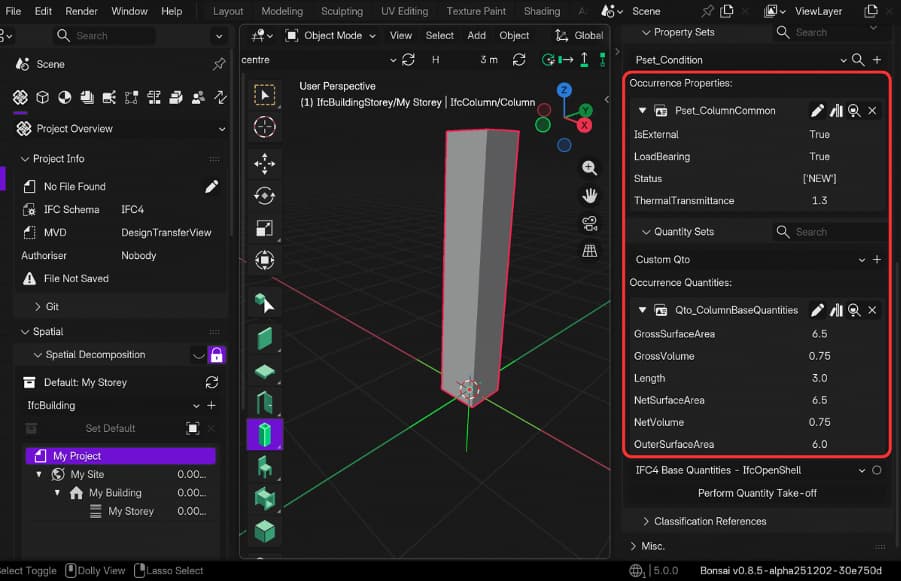
Fig 1. Bonsai BIM reading information about the column (quantities and Property Set)
Bonsai BIM's development has accelerated significantly in recent years. The platform now includes measurement tools, direct IFC element creation, parametric geometry generation for complex elements like stairs and roofs, visualisation of structural loads and reaction forces, quality assurance through IDS validation, quantity takeoff capabilities, clash detection and much more.
2.0 Why IFC-Native Tools Matter
Almost five years ago, I tried Bonsai BIM (called BlenderBIM back then) for the first time. What kept me coming back wasn't the modelling capabilities. It was something more fundamental: the way Bonsai BIM presents IFC data.
Most IFC tools out there, including the most popular ones, show you their interpretation of IFC. They translate the schema into their own terminology. You see properties and relationships through their lens, not as the IFC standard actually defines them.
Bonsai BIM shows you IFC, exactly as it exists in the schema; same terms, same structure, same relationships - no translation layer.
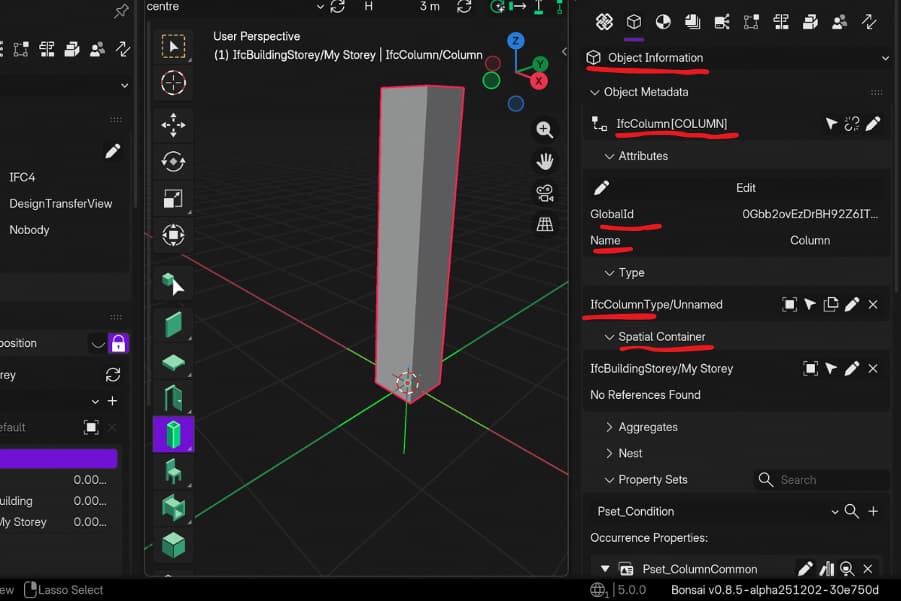
Fig 2. Highlighting how object information is presented in Bonsai BIM
For structural engineers troubleshooting complex models or validating detailed specifications, this direct access changes everything. You stop guessing what the exporting software meant and start seeing what the model actually contains.
2.1 The Real World Problem
Here's what happens in real projects; you receive an IFC file from another discipline. You open it in your software and discover that the coordinate system is offset by thousands of meters. Or the reinforcement data you need for fabrication isn't there, even though the designer insists it's in their model. Or other critical information is missing.
You spend hours figuring it out, you send emails, you wait for fixes. The coordination meeting gets delayed, the schedule slips. This isn't a software problem, it's an IFC validation problem. And it's exactly where Bonsai BIM becomes essential.
2.2 What You Actually Need
You don't need to abandon your current authoring software. You need a tool that can:
- Open any IFC file reliably, regardless of coordinate system issues
- Inspect the complete spatial structure and relationships
- Validate data against IDS requirements
- Identify missing properties, incorrect classifications or broken relationships
- Fix coordination problems before they escalate
- Extract data for analysis or reporting
And critically, you need to see this information as the IFC schema defines it, not filtered through another software's interpretation.
2.3 The Validation Workflow
From my experience on the tunnel project I coordinated since January 2023, this validation step saved us countless hours. We received IFC models from multiple design teams, using different software. Bonsai BIM became our quality control station, ensuring every model met specifications before it reached the construction site.
The workflow was simple:
- Receive IFC model
- Open in Bonsai BIM for inspection
- Validate against IDS requirements
- Communicate precise problems back to the source
- Verify fixes before accepting delivery
Because Bonsai BIM presents data exactly as the IFC schema defines it, there's no ambiguity in communication. When you tell a consultant that IfcColumn elements are missing the required LoadBearing property, they know exactly what you mean, no translation, no interpretation, no confusion.
2.4 Fixing IFC Models Directly
Here's where Bonsai BIM becomes even more valuable: you don't always need to send models back for fixes. Sometimes, that is not even possible. In situations like these, you can fix them yourself directly in Bonsai BIM.
Geometry fixes:
- Reposition models with coordinate system issues
- Align models from different disciplines
- Clean up problematic geometry that causes coordination issues
Information fixes:
- Add missing properties to elements
- Correct incorrect classifications (e.g., generic elements that should be structural)
- Remove information overload from over-detailed models
- Reclassify elements to match project requirements
Structural workflow example:
You receive a concrete model where columns are classified as generic IfcBuildingElementProxy instead of IfcColumn. In your authoring software, this might require re-export from the source. In Bonsai BIM, you can reclassify them directly, add the missing structural properties, and continue coordination immediately.
Or you receive a reinforcement model where bar diameters are stored in the wrong property set. Instead of waiting days for the designer to fix and re-export, you can correct the property assignments in Bonsai BIM and send the corrected model to fabrication the same day.
This capability to audit, validate and fix IFC models before they cause downstream problems is where Bonsai BIM delivers immediate, practical value. You're not replacing your authoring workflow. You're adding a quality control and problem-solving layer that saves time and prevents costly errors.
2.5 Beyond Validation: Native IFC Authoring
For those who want to go further, Bonsai BIM also supports full native IFC authoring. This is still a niche use case, not many people model directly in Bonsai BIM yet, but it's very possible and particularly practical for architectural and structural workflows.
When you model in Bonsai BIM, you're not creating geometry that gets converted to IFC later. You're working directly in IFC from the first element you place. Every column is an IfcColumn. Every beam is an IfcBeam. Every property you assign is stored exactly as the IFC schema defines it.
The benefits are clear: no translation errors, real-time validation, complete data control, and future-proof ownership. But for most structural engineers reading this, the primary value isn't authoring from scratch in Bonsai BIM.
3.0 What You Can Actually Do with Bonsai BIM
The IfcTester web interface allows you to create, edit, and validate IDS (Information Delivery Specification) files entirely in your browser.
Why this matters for structural engineers:
IDS files define what BIM data must be delivered and how it should be validated. For structural coordination, example IDS requirements:
- All structural steel beams must have: section property, material grade, connection type.
- All concrete columns must have: dimensions, concrete grade, reinforcement specification, fire rating.
- All foundations must have: bearing pressure, soil type, pile diameter (if applicable)
- All reinforcement must have: bar diameter, spacing, concrete cover, grade.
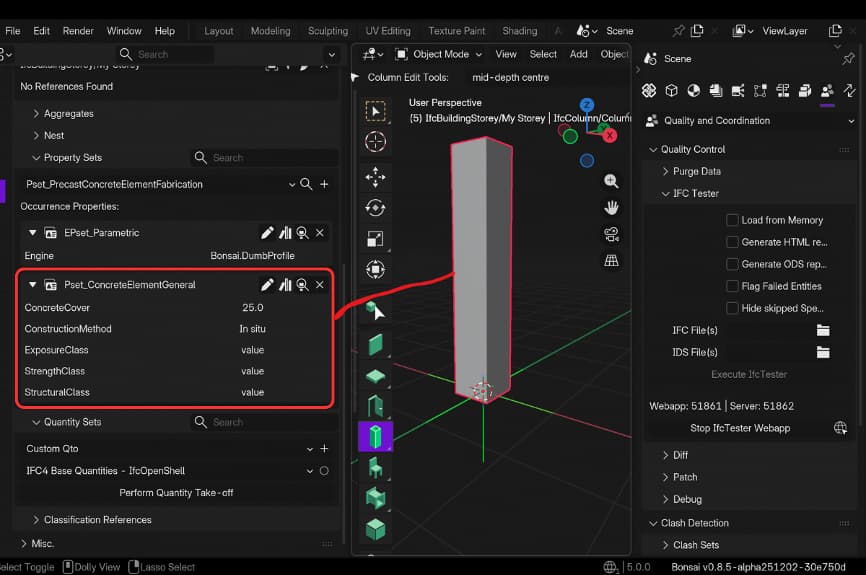
Fig 3. Concrete specific information in IFC
The workflow:
- Define your structural deliverable requirements in IDS format (using the web interface)
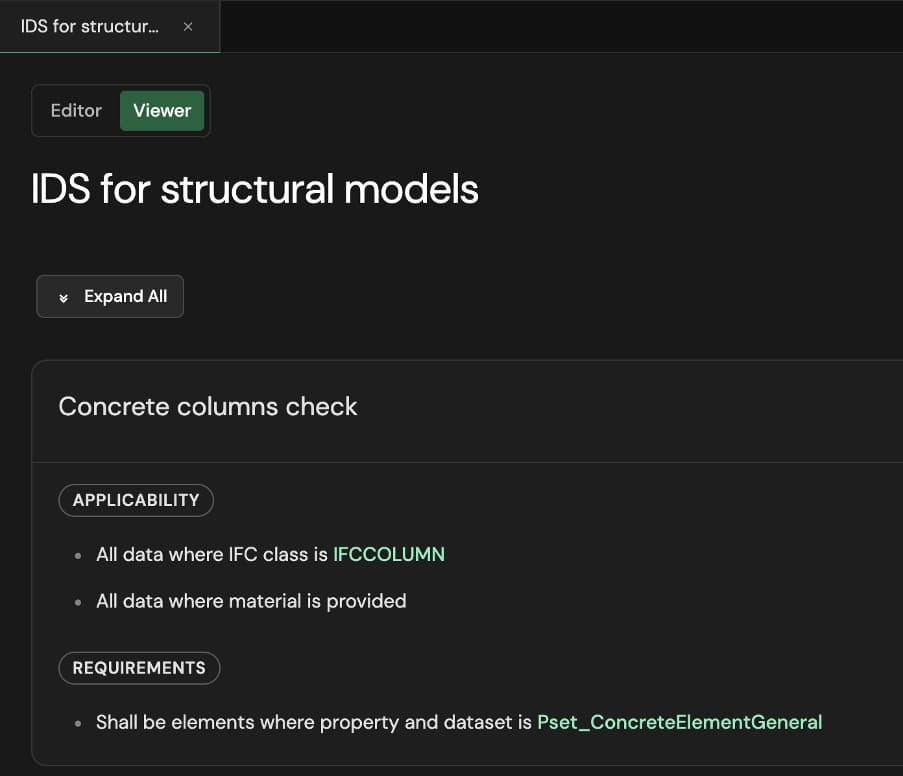
Fig 4. Information Delivery Specification. How a specification looks in human readable format.
-
Load your structural model (client-side, never uploaded anywhere)
-
Audit live as you develop the model
-
Receive immediate feedback: "Column C-12 missing concrete grade specification"
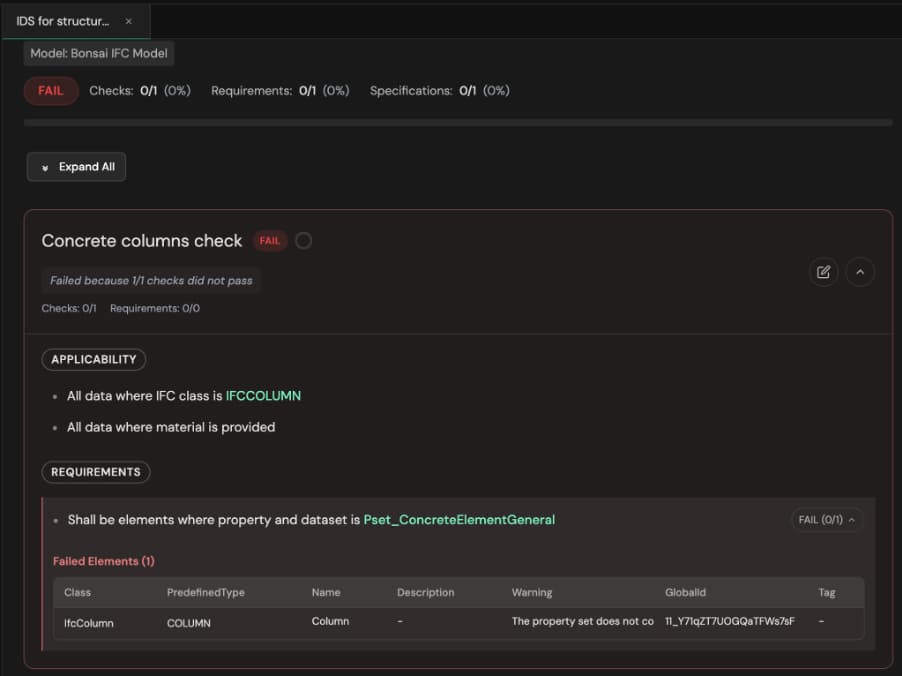
Fig 5. Information Delivery Specification. The report after running a check using IDS, in this case showing what specification was not met (the property set Pset_ConcreteElementGeneral information should be present for any concrete columns).
- Fix issues before submission
This is quality assurance built into your modelling process, not a post-delivery surprise. Whether you authored the model in Revit, Tekla, Allplan, or Bonsai BIM itself, you can validate the IFC output before sending it to clients.
For the tunnel project, IDS validation was critical. We had strict requirements for reinforcement data that needed to be machine-readable for automated fabrication. Bonsai BIM's IDS validation ensured every reinforcement model met specifications before it reached the steel fabricator.
3.1 Multi-Discipline Coordination with Clash Detection
Consider the following scenario: you're working on a hospital project and the structural model needs coordination with architecture (structural elements vs architectural finishes), MEP (structural beam depths vs duct routing), and civil (foundation elevations vs site grading). Each discipline maintains its own IFC file. In Bonsai BIM you can link (federate) these IFC models and run clash detection to identify conflicts between disciplines.
Example:
MEP ductwork conflicts with a structural beam at Grid B-3. The clash report identifies the conflicting elements, their location, and severity. In the coordination meeting, you decide to reduce the beam depth from 600 mm to 500 mm (structural check done separately). You update the structural model in your native authoring tool, re-export to IFC and re-federate. Running clash detection again in Bonsai shows the conflict resolved.
3.2 Measurement and Quantification
Structural engineers regularly need to extract quantities, areas, and linear measurements for calculations, specifications, and cost estimation. Bonsai BIM includes a comprehensive measurement suite: single-point measurements, polyline measurement, area calculation, and angle measurement. Critically, these measurements persist in your model, snap to elements with multi-target support, and allow you to continue working while the measurement tool is active.
For quantity takeoff workflows, extracting material volumes, element counts, and specifications is a fundamental capability. You can:
- Calculate concrete volumes by element type, grade, and pour sequence
- Extract structural steel tonnage by grade, member type, and fabrication shop
- Generate reinforcement quantities with bar schedules
- Determine formwork areas for cost estimation
- Calculate excavation volumes for foundations and earthworks
3.3 Costing and Scheduling Support
Bonsai BIM supports 5D BIM workflows by allowing you to attach cost data directly to IFC elements and link your model to project schedules.
Cost estimation
You can assign unit costs to any IFC element or group of elements. For structural work, this means:
- Attach cost per cubic meter to concrete elements by grade
- Assign fabrication and installation costs to steel members
- Add labor rates for formwork based on element complexity
- Include material costs for reinforcement by bar diameter and grade
Bonsai BIM automatically calculates total costs based on quantities extracted from the model. As your design changes, cost estimates update in real-time. You can export cost breakdowns to spreadsheets for detailed budgeting or integration with project management systems.
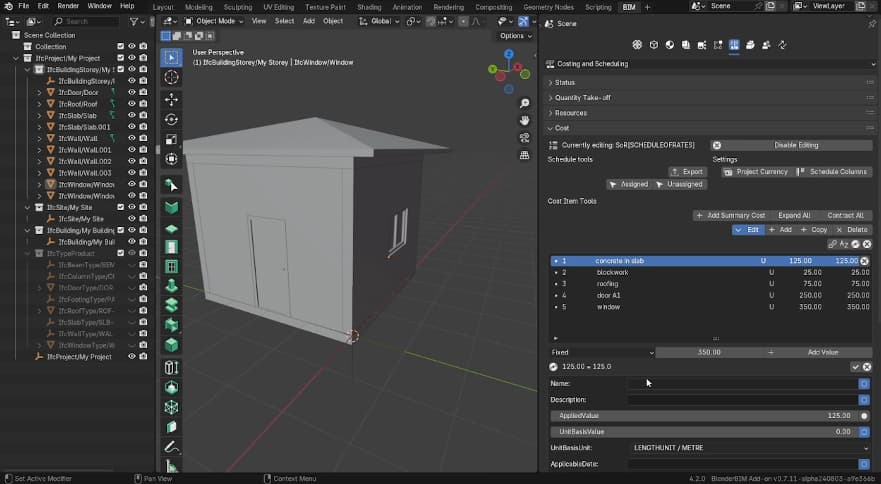
Fig 6. Costing information in IFC.
Schedule integration
Bonsai BIM allows you to link IFC elements to construction sequences and timelines. For structural projects:
- Assign pour sequences to concrete elements
- Link steel erection to fabrication and delivery schedules
- Connect foundation work to site preparation timelines
- Map reinforcement installation to concrete pour schedules
This creates a true 4D model where you can visualise construction progress over time. You can identify scheduling conflicts, optimise construction sequences, and communicate the build plan clearly to site teams.
The combination of quantity takeoffs, cost data, and schedule information in a single IFC environment means you're working with a unified data source. No manual transfers between quantity takeoff software, cost estimation tools, and scheduling platforms. Everything updates together as the design evolves.
4.0 Real Workflows for Structural Engineers
Let's examine how structural engineers can actually integrate Bonsai BIM into their work, not as a replacement, but as an essential complement.
4.1 Workflow One: IFC Quality Assurance Before Delivery
You've developed your structural model in Revit. Before submitting to the client, you need to verify all required data is present and correctly formatted.
Traditional workflow: Export to IFC, send to client, hope for the best, discover issues when client's QA process rejects the file.
With Bonsai BIM:
- Export your model to IFC from your primary authoring tool
- Open in Bonsai BIM for validation
- Use IDS validation to check against project requirements
- Identify missing properties, incorrect classifications, or broken relationships
- Fix issues in your authoring tool
- Re-export and validate
- Deliver with confidence
4.2 Workflow Two: Handling Problematic Coordinate Systems
You receive an IFC file from another discipline with coordinate system issues. Your primary authoring tool can't display it properly.
With Bonsai BIM:
- Open the model (Bonsai BIM handles large coordinates gracefully)
- Inspect the spatial structure and coordinate system
- Fix the georeferencing
- Import into your primary authoring tool for actual design work
Bonsai BIM handles the IFC coordination problem, freeing your commercial tools to focus on what they do best.
4.3 Workflow Three: Reinforcement Model Validation for Fabrication
You've modelled reinforcement in your authoring software. The steel fabricator needs machine-readable data with specific properties for automated bending and cutting.
With Bonsai BIM:
- Export reinforcement model to IFC
- Open in Bonsai BIM
- Validate against fabricator's IDS requirements
- Check that every rebar element has: diameter, length, bending schedule, grade, position reference
- Extract data to generate fabrication spreadsheet files
- Identify any missing data before sending to fabricator
This workflow prevented multiple issues on the tunnel project. Fabricators would reject models with incomplete data, causing delays. Bonsai BIM's validation ensured our reinforcement models were fabrication-ready.
4.4 Workflow Four: Multi-Discipline Federated Coordination
You need to coordinate with architecture, MEP, and civil, each using different authoring platforms.
With Bonsai BIM:
- Collect IFC files from each discipline
- Open in Bonsai BIM
- Check the models
- Share with team
- Each discipline addresses issues in their authoring tool
- Re-export, re-validate, iterate
Bonsai BIM becomes your coordination hub for IFC-based workflows.
4.5 Workflow Five: Legacy Project Investigation
A client sends you an IFC file from a project completed five years ago. They need information about the structural system for a renovation. The original authoring software is unknown or unavailable.
With Bonsai BIM:
- Open the IFC file,
- Inspect the complete spatial structure,
- Review element properties and relationships,
- Extract quantities,
- Generate reports for the client.
Because Bonsai BIM works with the open IFC standard, you can access project data regardless of how it was originally created.
5.0 Getting Started: Your Practical Path Forward
Below are some practical next steps you can take to explore Bonsai BIM further.
5.1 Download and Explore (2-3 hours)
Install Blender (free). Get the Bonsai BIM extension (also free via the Extensions menu in Blender). Follow the 15-minute tutorial exploring an existing IFC structural model. Follow the 20-minute tutorial on creating simple structural elements. You can find these tutorials and the sample model file here and here.
Focus areas for structural engineers:
- Opening and navigating IFC models
- Creating structural elements (columns, beams, slabs)
- Assigning material properties
- Extracting quantities
5.2 Test on Your Largest Model (30 minutes)
Do you have a massive model that struggles to open in your current software?
- Export it to IFC (if not already),
- Open it in Bonsai BIM,
- Experience the transformation.
This single capability might justify the learning investment.
5.3 Pilot with IFC Validation (1 week)
Rather than changing your authoring workflow, start by using Bonsai BIM as an IFC validation tool:
- Export a model from your primary authoring tool to IFC,
- Open in Bonsai BIM,
- Inspect the spatial structure,
- Check element properties,
- Identify any issues,
- Fix in your authoring tool and re-export.
This builds competency with manageable risk.
5.4 Consider Your Use Cases
Identify where Bonsai BIM would add value to your specific workflow:
- IFC quality assurance before delivery?
- Coordination with other disciplines?
- Handling problematic IFC files?
- Data extraction for fabrication?
- Learning IFC workflows?
- Reinforcement model validation?
You don't need to use Bonsai BIM for everything. Use it where it excels.
6.0 Conclusion: The Essential IFC Tool
Bonsai BIM represents something significant: the most capable IFC-native tool available for structural engineering workflows. This isn't about abandoning your existing BIM authoring software. It's about recognising that working effectively with IFC, which is increasingly central to modern construction workflows, especially in Europe, requires tools specifically designed for it.
If you're not already paying thousands of dollars annually for IFC-specific tools, Bonsai BIM gives you professional-grade capability with zero licensing fees.
If you already use commercial platforms, Bonsai BIM becomes an essential complement for IFC-specific workflows: quality assurance, coordination, troubleshooting, and specialised data extraction.
The trajectory is unmistakable - governments and public projects are increasingly mandating open standards like IFC. The openBIM Harmony initiative is expanding across the European Union, making IFC competency essential for structural engineers participating in public infrastructure and building projects. This creates space for tools like Bonsai BIM to thrive.
The question isn't whether to replace your existing tools - the question is whether adding the best IFC-native tool available to your workflow makes professional sense.
Given...
- the cost of entry (zero),
- the exceptional capability for handling IFC data,
- the quality assurance capabilities
- the unmatched IFC data transparency
...exploring Bonsai BIM is simply smart professional judgment.
Consider it. Test it on a real project. Join the BIMvoice Academy & OSArch community. Contribute your structural engineering perspective to the platform's development. The tools we collectively build determine the profession we collectively practice.
Join the free BIMvoice Academy community and start the 7-day OpenBIM Kickstart Challenge. Learn IFC fundamentals, IDS validation, and practical Bonsai BIM workflows you can apply immediately.
The cover image for this article is adapted from the Bonsai BIM website.

Featured Tutorials and Guides
If you found this tutorial helpful, you might enjoy some of these other tutorials.

Steel Column Design using Eurocode 3 - A Complete Guide
Learn how to design steel columns subject to compression and biaxial bending.

Callum Wilson

Simulating crowd vibrations using the Duhamel Integral
Learn about the Duhamel Integral & how it can be used to simulate crowd-induced vibrations in Python

Dr Seán Carroll